At Ignite’s latest edition, Microsoft announced the general availability of Microsoft-Decision-1.1, a model that isn’t built to chat, write or reason at length. It’s built to decide: routing, classification, prioritization, verification and workflow control. Instead of a paragraph of text, it returns a structured answer, quickly and at low cost. Microsoft says it’s more than twice as fast as the first version, and that it reports calibrated confidence so an application can defer to a person when it isn’t sure.
That’s a promising profile for automation, and as a Copilot Studio builder my question was practical: what does it look like inside a real workflow? Classifying incoming email is one of the most common steps I see, and it’s usually done with a general-purpose LLM. So I put the two approaches side by side, using Microsoft-Decision-1.1 and GPT-6 Luna.
The experiment
To compare the two models in a realistic scenario, I built a Copilot Studio workflow that triages support tickets. The workflow reads 300 support tickets stored in a Dataverse table and classifies each one based on its subject and body. The model has to choose one of three categories: Billing, Technical or Account. If a ticket doesn’t clearly fit any of them, it goes to a fourth outcome, Other.
Each category has the following description:
- Billing: Money questions about an existing customer’s subscription: charges, double or unexpected charges, refunds, invoices (copies, corrections, VAT or tax ID), payment methods and failed payments, renewal prices. Not billing: login problems, errors in the product, or sales quotes from people who are not customers yet.
- Technical: Something in the product is broken or not working as expected: error messages, crashes, pages that do not load, slow performance, sync or export problems, API or webhook failures, integrations. Not technical: forgotten passwords or access and permission changes (those are account), and questions about charges (those are billing).
- Account: Managing who has access and how the account is set up: login and password help, locked accounts, two-step verification (MFA) resets, changing the account email or name, adding or removing users, roles and permissions, transferring ownership, merging or deleting an account. Not account: product errors that affect many users, and questions about invoices or payments.
The 300 tickets are synthetic, so no real customer data is involved, and each has an expected category that I set beforehand. The set is balanced, with 75 tickets per category. Most are written in English, with a share in Spanish and Catalan and a few mixing languages. 36 of the tickets are deliberately ambiguous: they mix two topics, are very short or vague, or could reasonably belong to two categories.
You can download the full test set (Excel, with the expected category and difficulty of each ticket) from the decision-vs-gpt-6-luna-email-test-set repository on GitHub, and reuse it to run the same test with your own models.
The setup
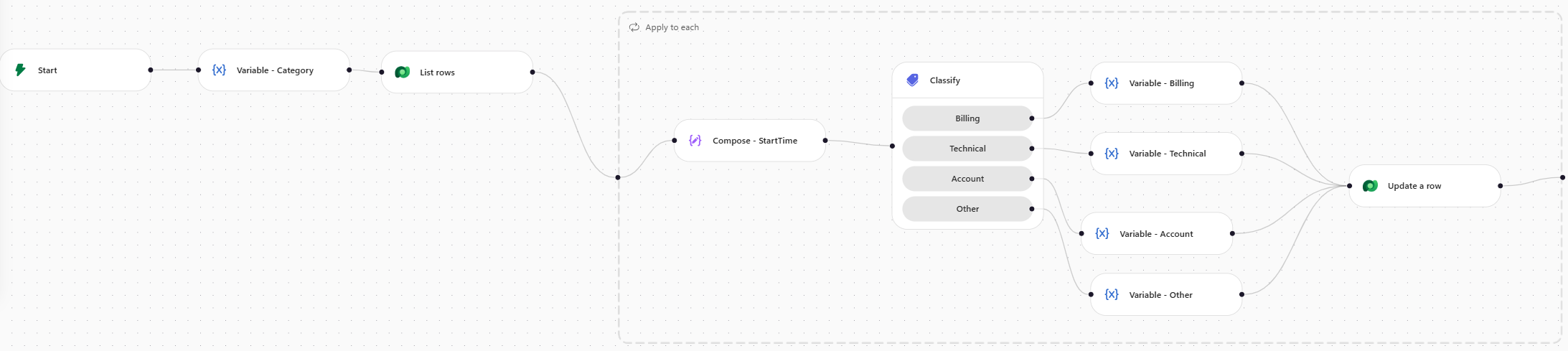
For each ticket, the workflow:
- Reads the next row from Dataverse (only rows without a result yet, so a run can resume).
- Records the start time.
- Sends the subject and body to the Classify node, with a description of each category.
- Branches by the result and writes the category to the ticket row, together with the time the classification took in milliseconds.
Here’s a screenshot of the workflow:
And which models can you choose? At the time of writing, the Classify node in Copilot Studio workflows lets you pick the model that does the classification. The list in my environment is the following:
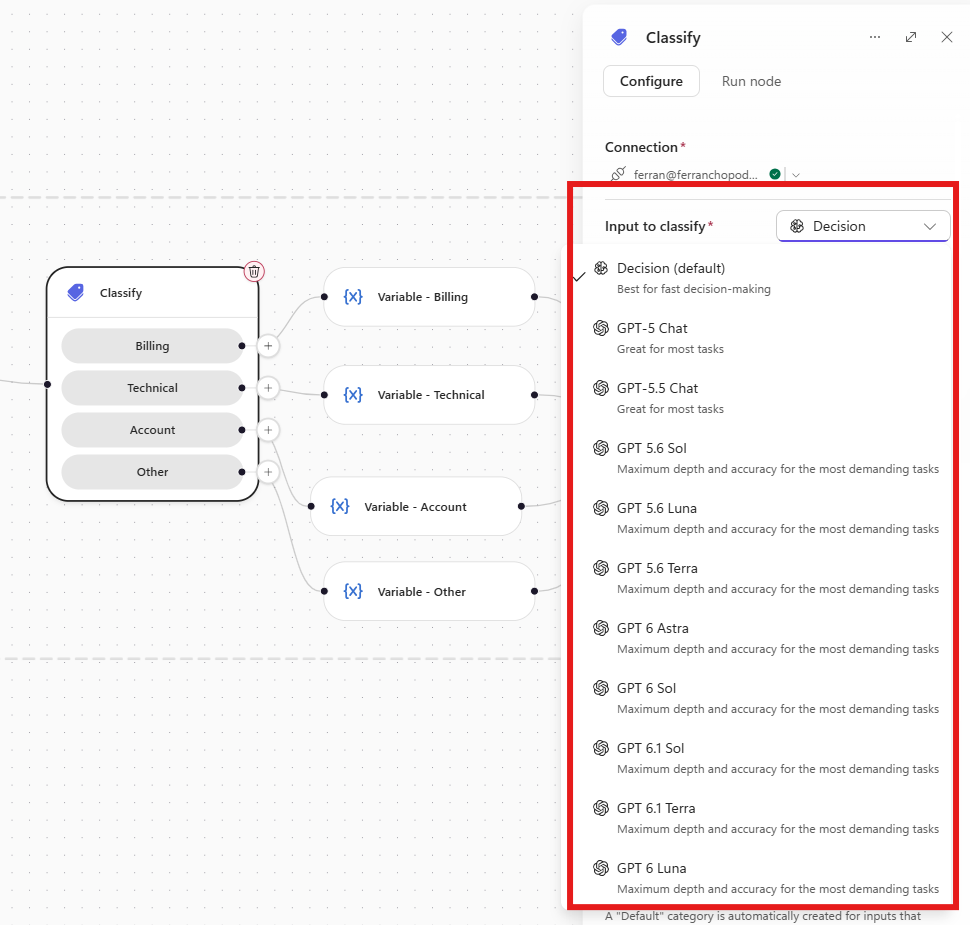
One practical note: the Decision model didn’t appear in the list until I opened Copilot Studio through the preview portal (https://copilotstudio.preview.microsoft.com). If you don’t see it in your environment, that’s the first thing to try. Model availability changes quickly and can depend on your tenant, region and admin settings, so your list may differ from mine.
Test and results
I ran the workflow once with Microsoft-Decision-1.1 and once with GPT 6 Luna, changing only the model selected in the Classify node. The category descriptions, the input and the rest of the flow were identical, and tickets were processed one at a time so that timings weren’t affected by parallel runs.
I measured:
- Accuracy: The model’s category compared with the expected one.
- Latency: The time per ticket in milliseconds.
- Cost: The Copilot credits consumed by each full run.
And the results are the following:
| Accuracy (300 emails) | Decision | GPT-6 Luna |
|---|---|---|
| All emails | 296 / 300 (99%) | 297 / 300 (99%) |
| Clear emails | 264 / 264 (100%) | 264 / 264 (100%) |
| Ambiguous emails | 32 / 36 (89%) | 33 / 36 (92%) |
Accuracy is the same in both cases! Both models classified 99% of the 300 tickets correctly, and both got every clear ticket right. The only difference is one ticket among the 36 ambiguous ones (32 vs 33 correct), which is well within the margin of error for a sample this size. For a task with clear categories, neither model is more accurate. The differences showed up only in vague or mixed-topic tickets, and some of those are debatable even for a person.
| Latency (per email) | Decision | GPT-6 Luna |
|---|---|---|
| Typical (median) | 0.8 s | 6.2 s |
| Average | 1.7 s | 7.0 s |
| Total (for 300 emails) | 8.5 min | 35 min |
Decision is much faster! A typical ticket took 0.8 seconds with Decision and 6.2 seconds with GPT-6 Luna, roughly 7 times faster. Over the whole run, Decision needed 8.5 minutes for 300 tickets against 35 minutes. This matters most when the classification is a step in a live process, such as routing an email as it arrives, where a few seconds of waiting adds up. Decision’s average (1.7 s) is higher than its median because a few calls were slow, so a user may occasionally wait longer than the typical time.
| Cost (Copilot credits) | Decision | GPT-6 Luna |
|---|---|---|
| 300 emails | 199 | 640 |
| Per email | 0.7 | 2.1 |
| Per 1,000 emails | About 660 | About 2,130 |
Decision is about 3 times cheaper! Classifying 300 tickets consumed 199 Copilot credits with Decision and 640 with GPT-6 Luna, around 0.7 versus 2.1 credits per ticket. At 1,000 tickets that’s about 660 credits against 2,130. These figures include the workflow’s other actions, so the difference between the two models themselves is probably larger than the 3x. The gap grows with volume, so it matters most for high-volume scenarios.
Conclusions
Based on this test, Decision comes out ahead for this kind of task. It matched GPT-6 Luna on accuracy while being faster and cheaper. That fits what the model was built for: routing, classification and other structured decisions where you need a fast, low-cost answer, not a long explanation. A general model such as GPT-6 Luna remains the better choice when the task needs reasoning, generating text or explaining its decision.
But what if most of your emails are ambiguous or not so easy to classify? What if you need an explanation of the decision the model took? Should we define some criteria, or build something that decides which model to use depending on the case? For example, a first pass with Decision for everything, with the doubtful cases (such as the ones it puts in “Other”) sent to a more capable model or to a person.
As always, it depends on the requirements. We need to test and evaluate with our own data to find which model gives the best balance between accuracy and cost, and, depending on the case, latency.